Organic reach of Facebook page posts is dropping. More often than not you need to boost your posts and create ads to get any meaningful reach on Facebook.
When you spend money you need to measure results. In this post I will show you how to track all your Facebook ad spending in Google Analytics.
When I wrote about measuring your social media success with Google Analytics I got a lot of feedback. One important point was that there's a little “but” with analyzing visitors from social media by referrers. A lot of visitors use external desktop or mobile clients. This social media traffic will register as direct traffic in Google Analytics.
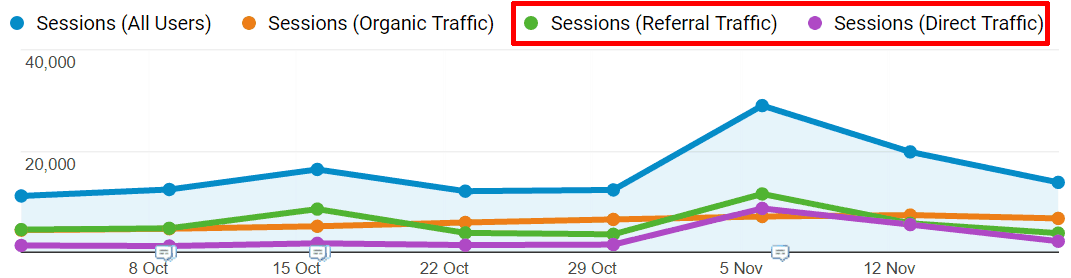
In our website, we estimate that more than half of the visits from Twitter show up as direct traffic. As you can see from the image, when we had a peak in Twitter then direct traffic grew more than referrals, and we saw only 8 percent of visitors coming from Twitter. To find out more about this read Thomas Baekdal's Don't Trust Your Social Referral Data.
However there's a way to register those visits as non-direct if you add special Google Analytics tags to the original link. Below is the link tagging template that lets you tag all the links you put into social channels. This ensures that you know where visitors are coming from. Here's a simple guide how to tag your links for social media sites yourself. Take the address you want to use and attach a simple code to it. The final URL you use for your posts, ads, and email will look like this:
https://www.example.com/example-landing-page/?utm_source=google&utm_medium=cpc&utm_campaign=spring_sale&utm_term=keyword&utm_content=different_ads
Just copy the address above and edit it by hand. You are done! Now when people click on the link you created it will not be logged as direct traffic even if they do it in the desktop client. (This can also be used for tagging links in ads, other websites, and email).
You can do it like a pro in any text editor or use Google Campaign URL Builder.

Short explanation what the fields mean
Media Channel (utm_source)
Required field. utm_source tag defines the channel where you put the link. Media channel can be various social networking sites, web portals, email, etc. You can see the results of this tag in Traffic Sources report. Example: utm_source=Facebook, utm_source=Twitter, utm_source=OurNewsletter
Media Type (utm_medium)
Required field. utm_medium tag lets you define in what form the link is presented. Media Type can be statusupdate, tweet, email, etc. The default media types in Google Analytics are organic and referral. Example: utm_medium=tweet, utm_medium=textad, utm_medium=email
Keyword (utm_term)
Not required. Use utm_term if you want to differentiate between links in searches for specific keywords (in non-Google search engines). Google Adwords does this automatically. You need this tag for search advertising where the search engine itself does not tag the links. Example: utm_term=product1, utm_term=service2
Content (utm_content)
Not required. Use utm_content for different links that are in the same media channel. If you tag links for Twitter, then the channel and type are always the same but the content changes. You can see what content generates the most clicks from Google Analytics Traffic Sources > Ad Versions report. Example: utm_content=GAtweet, utm_content=FBtweet
Campaign Name (utm_campaign)
Required field. Use utm_campaign tag for different campaigns to give you a better overview of what media channels and types are related to your different activities. A campaign can be Blogging, Newsletter001, FacebookPromo, etc. You can see how your campaigns are doing in Google Analytics Traffic Sources > Campaigns report. Example: utm_campaign=Spring11, utm_campaign=RegularBlogging, utm_campaign=Email01
The simplest link you can create for your site contains three elements:
https://www.example.com/example-landing-page/?utm_source=google&utm_medium=cpc&utm_campaign=spring_sale
Where are UTM Tags Google Analytics?
There are two main reports where you can see how the tagged links are performing. The first and most informative is Sources/Medium report where you can compare tagged traffic to other channels:
Acquisition > All Traffic > Sources/Medium

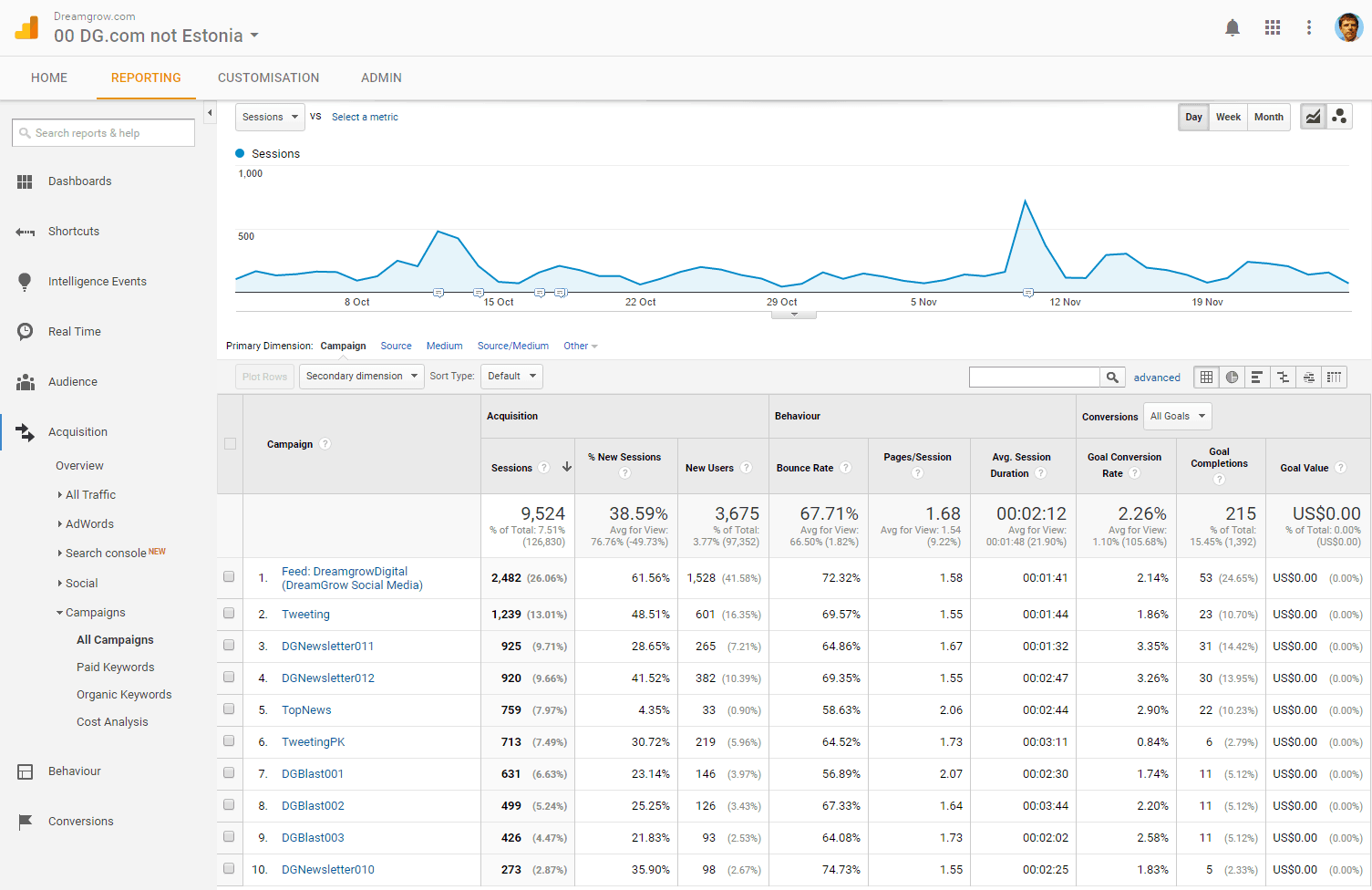
The second report combines all your tagged traffic in one view. You can find it here:
Acquisition > Campaigns > All Campaigns
Tag all the links you use in your marketing
I suggest that you tag all the links you use in your marketing:
- Social channels like Facebook, Twitter, Linkedin, etc.
- Links on you share buttons
- All links you include in your marketing emails
- Links in your CPC and display ads (Google Adwords does this automatically)
This way you will make sure that all traffic is measured correctly and you can analyze them easily in Google Analytics.
Important!
Don’t tag links on your website. Use Google Analytics events if you need to track internal links. When you tag your internal links with UTM tags, you will lose original referrer data. Every time a user clicks a tagged link, Google Analytics starts a new session. For example:
Regular links on the page
Session 1: google /organic > page 1 > page 2 > page 3 > page 4
When internal link is tagged
Session 1: google /organic > page 1 > page 2 (click on tagged link) Session 2: page 3 > page 4